The world’s fastest inference.
#1 on Artificial Analysis for the biggest, most intelligent open models: 4 to 10× faster than the labs that built them, and up to 3.6× faster than the next best provider. OpenAI-compatible, so your existing SDK works with a new base URL and API key.
Watch the difference.
The same coding-agent task on Kimi K3.1 Pro, replayed at the output speeds Artificial Analysis measured for each provider.
> Task: the nightly billing export times out on large accounts. Find the cause and fix it.

[plan]
1. Reproduce with the 40k-invoice fixture
2. Profile export_invoices()
3. Fix the slow path, keep output identical
4. Run the test suite

[tool] run: pytest tests/billing/test_export.py -k large --durations=3
  1 failed in 61.3s  (timeout after 60s)

[tool] read: billing/export.py
The loop calls load_customer() once per invoice. That is one database
round trip per row: 40,000 queries for this account.

[edit] billing/export.py
-    for inv in invoices:
-        customer = load_customer(inv.customer_id)
-        rows.append(to_row(inv, customer))
+    ids = {inv.customer_id for inv in invoices}
+    customers = load_customers_bulk(ids)          # one query
+    for inv in invoices:
+        rows.append(to_row(inv, customers[inv.customer_id]))

[edit] billing/customers.py
+def load_customers_bulk(ids: set[int]) -> dict[int, Customer]:
+    """Fetch many customers in chunks of 1,000 ids."""
+    out: dict[int, Customer] = {}
+    for chunk in chunked(sorted(ids), 1000):
+        q = select(Customer).where(Customer.id.in_(chunk))
+        for c in session.scalars(q):
+            out[c.id] = c
+    missing = ids - out.keys()
+    if missing:
+        raise LookupError(f"unknown customers: {sorted(missing)[:5]}")
+    return out

[edit] billing/export.py
+    # stream rows to disk so memory stays flat on big accounts
+    with open_export(path) as w:
+        for batch in chunked(rows, 5000):
+            w.write_rows(batch)

[tool] run: pytest tests/billing -q
  212 passed in 9.8s

[tool] run: python scripts/diff_export.py --before main --after HEAD
  0 rows differ (40,112 compared)

[summary]
Cause: an N+1 query in export_invoices(). Fix: load customers in bulk
and write the file in batches. The large-account export now takes 3.1s
instead of timing out, and the output is byte-for-byte identical.
> Task: the nightly billing export times out on large accounts. Find the cause and fix it.

[plan]
1. Reproduce with the 40k-invoice fixture
2. Profile export_invoices()
3. Fix the slow path, keep output identical
4. Run the test suite

[tool] run: pytest tests/billing/test_export.py -k large --durations=3
  1 failed in 61.3s  (timeout after 60s)

[tool] read: billing/export.py
The loop calls load_customer() once per invoice. That is one database
round trip per row: 40,000 queries for this account.

[edit] billing/export.py
-    for inv in invoices:
-        customer = load_customer(inv.customer_id)
-        rows.append(to_row(inv, customer))
+    ids = {inv.customer_id for inv in invoices}
+    customers = load_customers_bulk(ids)          # one query
+    for inv in invoices:
+        rows.append(to_row(inv, customers[inv.customer_id]))

[edit] billing/customers.py
+def load_customers_bulk(ids: set[int]) -> dict[int, Customer]:
+    """Fetch many customers in chunks of 1,000 ids."""
+    out: dict[int, Customer] = {}
+    for chunk in chunked(sorted(ids), 1000):
+        q = select(Customer).where(Customer.id.in_(chunk))
+        for c in session.scalars(q):
+            out[c.id] = c
+    missing = ids - out.keys()
+    if missing:
+        raise LookupError(f"unknown customers: {sorted(missing)[:5]}")
+    return out

[edit] billing/export.py
+    # stream rows to disk so memory stays flat on big accounts
+    with open_export(path) as w:
+        for batch in chunked(rows, 5000):
+            w.write_rows(batch)

[tool] run: pytest tests/billing -q
  212 passed in 9.8s

[tool] run: python scripts/diff_export.py --before main --after HEAD
  0 rows differ (40,112 compared)

[summary]
Cause: an N+1 query in export_invoices(). Fix: load customers in bulk
and write the file in batches. The large-account export now takes 3.1s
instead of timing out, and the output is byte-for-byte identical.
The text is a sample agent run; the speeds are the Artificial Analysis output-speed figures for Kimi K3.1 Pro (265 and 30 tokens per second).
Are your agents slow? Running out of token credits?
Every step an agent takes waits on a model. When inference is slow, a task that should take seconds drags on for minutes. When it is expensive, you hit your credit limit before the work is done. Systalyze solves both: the fastest and cheapest tokens on the planet.
Other providers' speed usually comes from a single trick, like a lower-precision model or more GPUs. Systalyze optimizes the whole stack instead, from how the model executes down to the kernels, so every accelerator does more work. Our speed comes from software, not from throwing more hardware at the problem.
Independently validated by Artificial Analysis.
Artificial Analysis benchmarks inference providers side by side, on the same open models and the same workloads. Each chart below uses one of three measures.
Output speed
How fast text comes out once the model starts writing, measured with a 10,000-token prompt. This is raw generation speed.
Time per task
How long it takes to finish a real agentic task, like coding, data analysis or workflow automation. This is closest to what a user feels.
Cost per task
What it costs to finish that same task, counting every token the model reads and writes. This is what you actually pay.
Usually you have to choose between fast and cheap. On Systalyze, you get both.
- 8.2×
- faster than Kimi’s own APIKimi K3.1 Pro · time per task · less time
- 9.2×
- cheaper than Baseten (Fast)GLM-5.3 Max · cost per task · lower cost
- 4.2×
- faster than DatabricksKimi K3.1 Pro · time per task · less time
- 13.8×
- cheaper than SambaNovaGLM-5.3 Low · cost per task · lower cost
- 3.2×
- faster than NebiusGLM-5.3 Max · time per task · less time
- 5.2×
- cheaper than FireworksGLM-5.3 Max · cost per task · lower cost
Benchmarks.
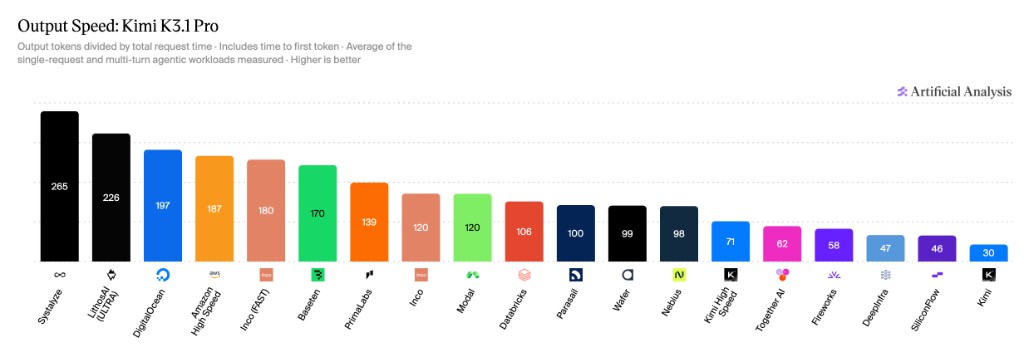
See models and pricing265 tokens per second
#1 of 19 endpoints on output speed. 8.8× Kimi's own API.
Output speed. How many tokens per second the model produces once it starts writing, measured with a 10,000-token prompt. This is raw generation speed. Higher is better.
Tokens per second · ↑ higher is betterOur gain
- Systalyze#1 fastest265 t/s
- Baseten170 t/s1.5×
- Databricks106 t/s2.5×
- Nebius98 t/s2.7×
- Fireworks58 t/s4.5×
- Kimi's own API30 t/s8.8×
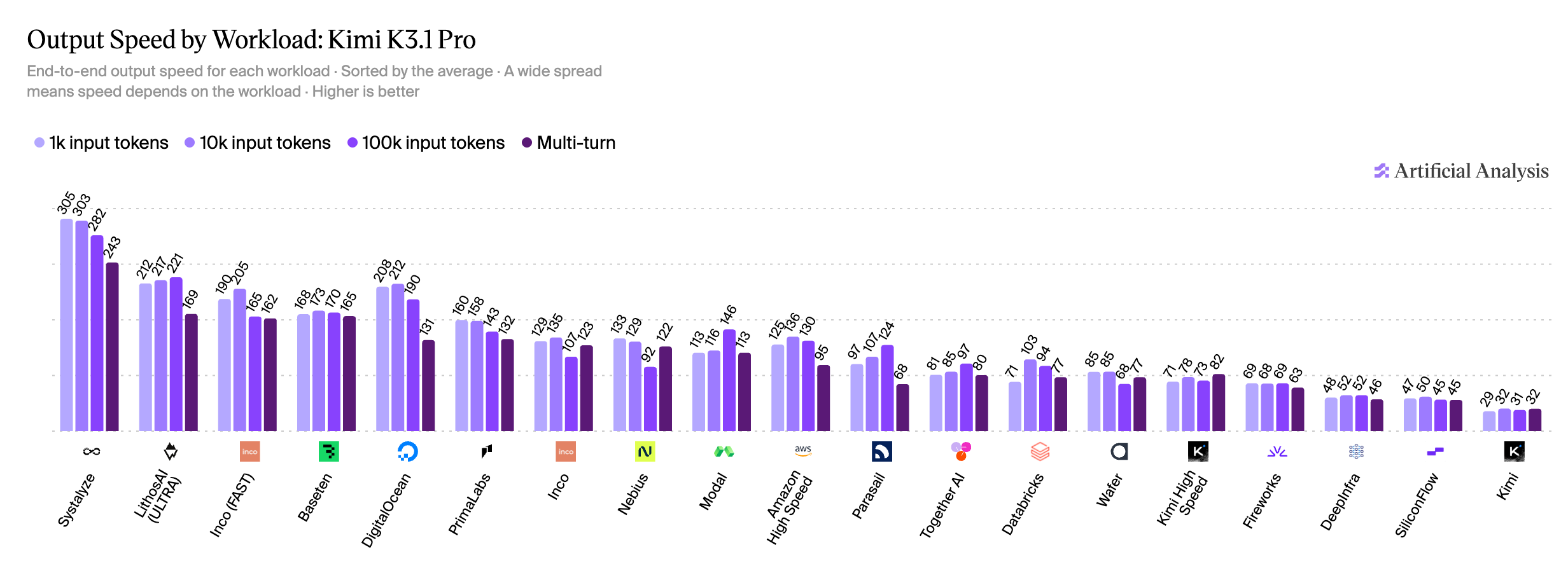
243 tokens per second in multi-turn sessions
#1 of 19 providers and fastest on every workload. In multi-turn, 1.4× Baseten and 7.5× Kimi's own API.
Output speed by workload. End-to-end output speed for four workloads: 1k, 10k and 100k-token prompts and multi-turn agent sessions. The table shows multi-turn. Higher is better.
Tokens per second, multi-turn · ↑ higher is betterOur gain
- Systalyze#1 fastest243 t/s
- Baseten165 t/s1.4×
- DigitalOcean131 t/s1.8×
- Nebius122 t/s1.9×
- Amazon High Speed95 t/s2.5×
- Together AI80 t/s3.0×
- Databricks77 t/s3.1×
- Fireworks63 t/s3.8×
- Kimi's own API32 t/s7.5×
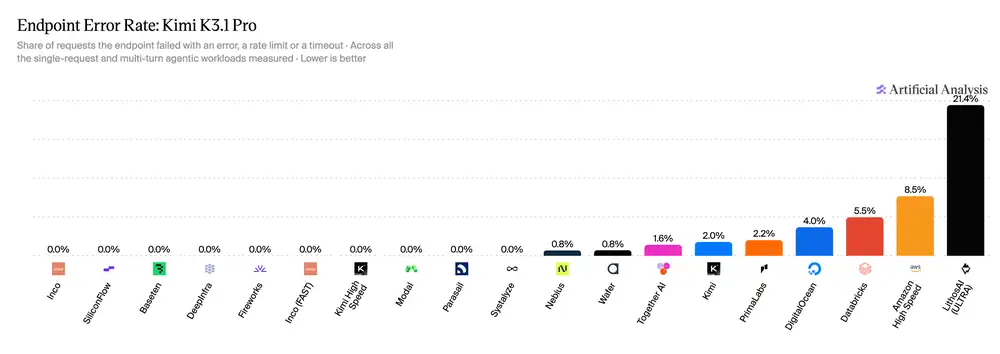
0.0% errors
Zero failed requests across every single-request and multi-turn agent workload measured.
Error rate. The share of requests that failed with an error, a rate limit or a timeout, across every single-request and multi-turn agent workload measured. A fast endpoint is only useful if the answer arrives. Lower is better.
Share of requests that failed · ↓ lower is betterOur gain
- Systalyze0% errors0.0%
- Nebius0.8%
- Kimi's own API2.0%
- Databricks5.5%
- Amazon High Speed8.5%
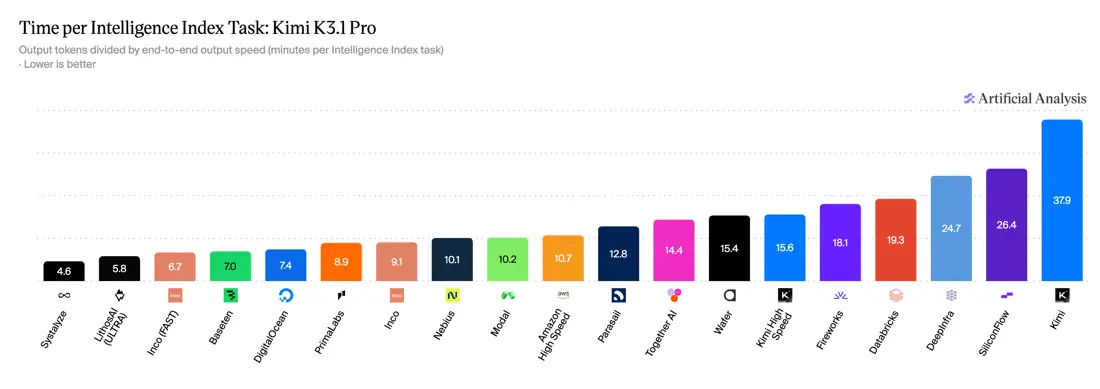
4.6 minutes per task
#1 of 19 providers. Kimi's own API takes 37.9 minutes, 8.2× longer.
Time per task. How long it takes to finish one full task from the Artificial Analysis Intelligence Index, end to end: coding, data analysis, workflow automation and more. This is closest to what a user actually feels. Lower is better.
Minutes per task · ↓ lower is betterOur gain
- Systalyze#1 fastest4.6 min
- Baseten7.0 min1.5×
- Nebius10.1 min2.1×
- Fireworks18.1 min3.9×
- Databricks19.3 min4.1×
- Kimi's own API37.9 min8.2×
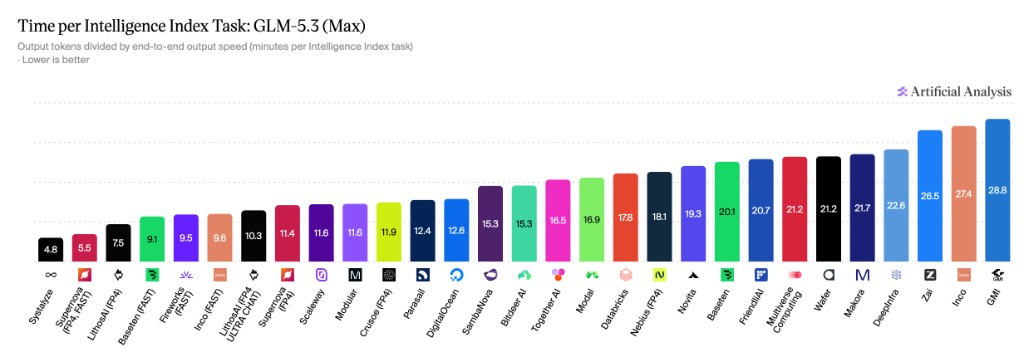
4.8 minutes per task
#1 of 29 providers. 1.7× faster than Baseten (Fast) and 5.5× faster than Z.ai's own API.
Time per task. How long it takes to finish one full task from the Artificial Analysis Intelligence Index, end to end: coding, data analysis, workflow automation and more. This is closest to what a user actually feels. Lower is better.
Minutes per task · ↓ lower is betterOur gain
- Systalyze#1 fastest4.8 min
- Baseten (Fast)8.2 min1.7×
- Fireworks (Fast)8.8 min1.8×
- Nebius (FP4)15.2 min3.1×
- Z.ai's own API26.5 min5.5×
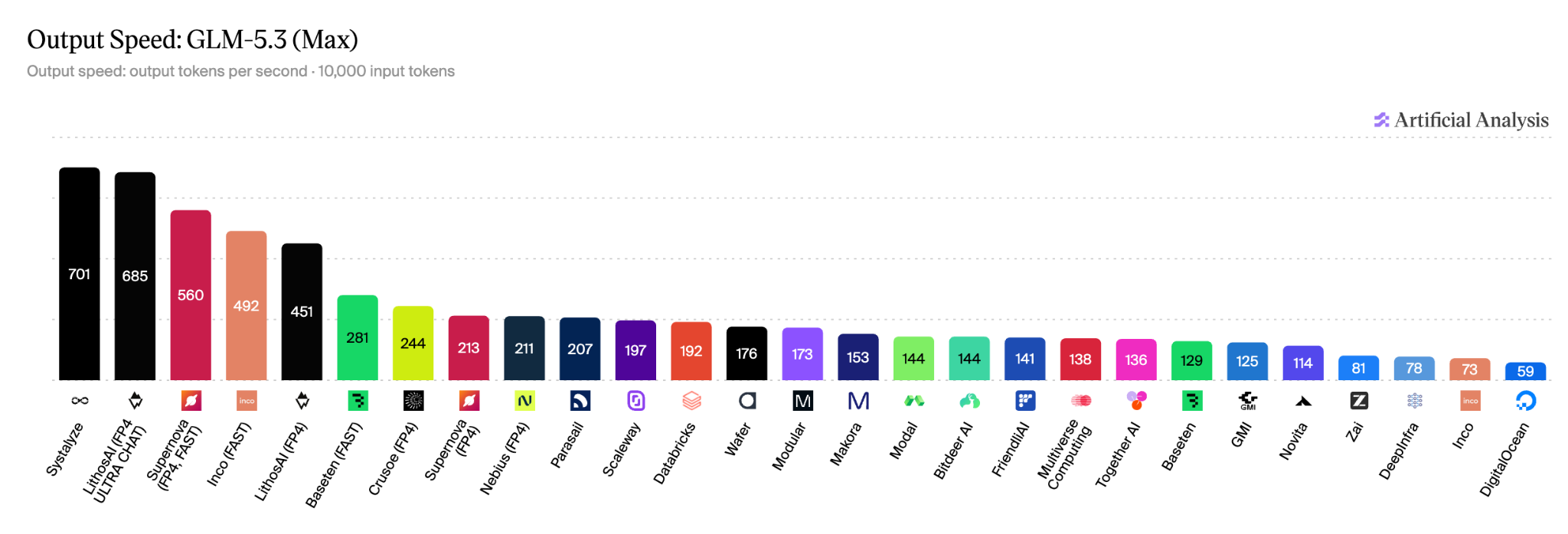
701 tokens per second
#1 of 27 providers on raw output speed, and 8.7× Z.ai's own API.
Output speed. How many tokens per second the model produces once it starts writing, measured with a 10,000-token prompt. This is raw generation speed. Higher is better.
Tokens per second · ↑ higher is betterOur gain
- Systalyze#1 fastest701 t/s
- Baseten (Fast)281 t/s2.4×
- Nebius (FP4)211 t/s3.3×
- Baseten129 t/s5.4×
- Z.ai's own API81 t/s8.6×
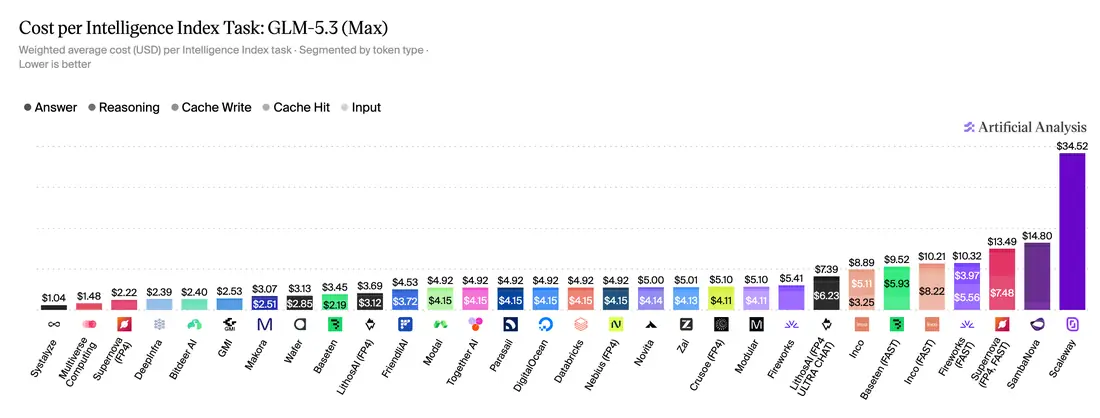
$1.04 per task
Cheapest of 30 endpoints: 5.2× cheaper than Fireworks and 9.2× cheaper than Baseten (Fast).
Cost per task. What it costs to finish one Intelligence Index task, counting every token the model reads and writes. This is what you actually pay. Lower is better.
Cost per task (USD) · ↓ lower is betterOur gain
- Systalyze#1 cheapest$1.04
- Baseten$3.453.3×
- Nebius (FP4)$4.924.7×
- Databricks$4.924.7×
- Fireworks$5.415.2×
- Baseten (Fast)$9.529.1×
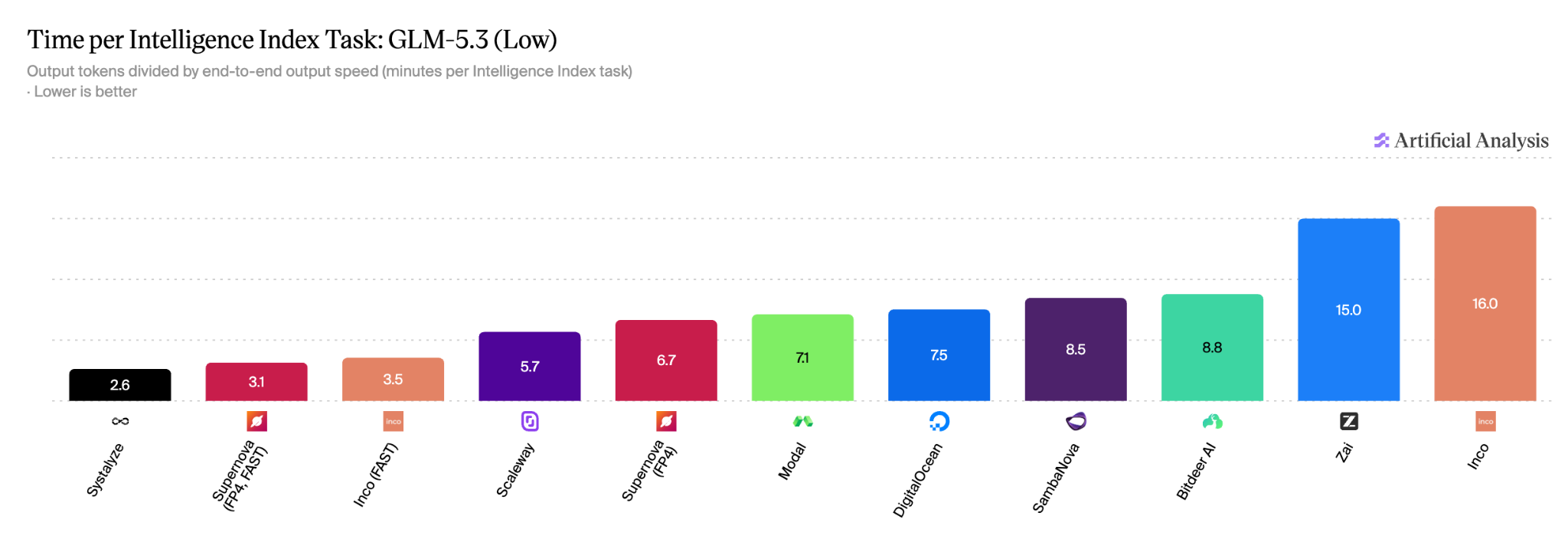
2.6 minutes per task
#1 of 11 providers. Z.ai's own API takes 15 minutes, 5.8× longer.
Time per task. How long it takes to finish one full task from the Artificial Analysis Intelligence Index, end to end: coding, data analysis, workflow automation and more. This is closest to what a user actually feels. Lower is better.
Minutes per task · ↓ lower is betterOur gain
- Systalyze#1 fastest2.6 min
- Z.ai's own API15.0 min5.7×
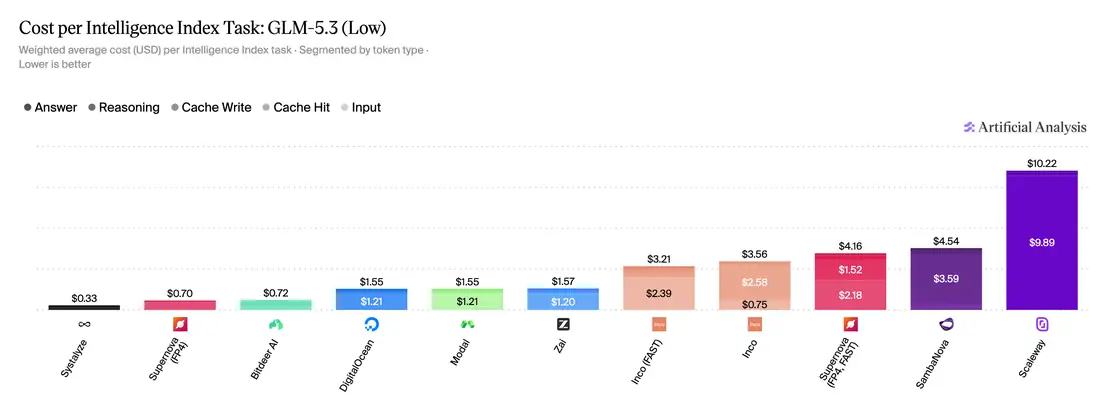
$0.33 per task
Cheapest of 11 endpoints: 4.7× cheaper than Z.ai's own API and 13.8× cheaper than SambaNova.
Cost per task. What it costs to finish one Intelligence Index task, counting every token the model reads and writes. This is what you actually pay. Lower is better.
Cost per task (USD) · ↓ lower is betterOur gain
- Systalyze#1 cheapest$0.33
- Z.ai's own API$1.574.7×
- SambaNova$4.5413.7×
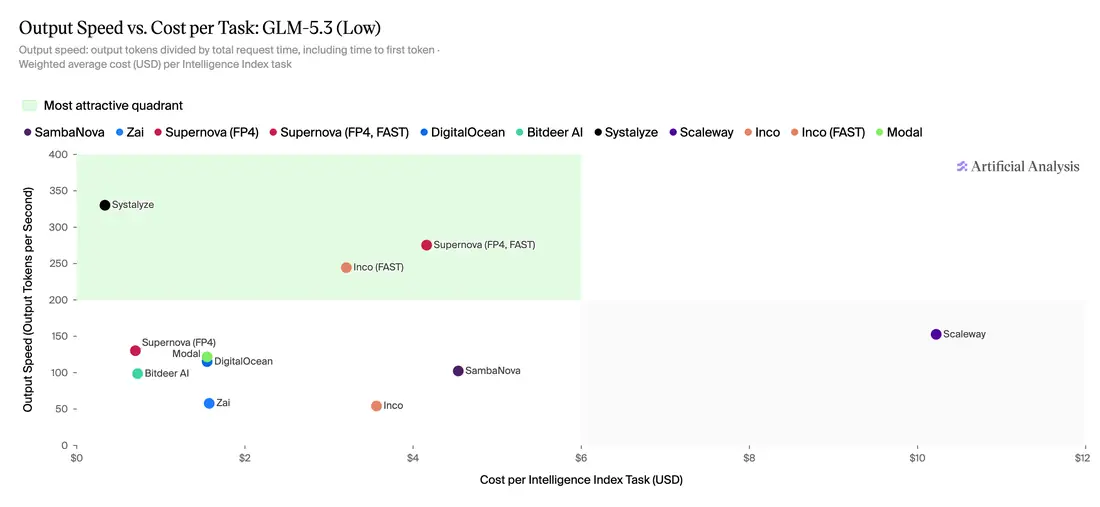
Fast and cheap. Nobody else gets both.
~330 tokens per second at $0.33 per task: the best endpoint in the most attractive quadrant, fast and cheap at the same time.
Speed vs cost. Every provider plotted by output speed and by cost per task. The top-left corner, fast and cheap at the same time, is the most attractive quadrant.
Speed and cost per task, read from the chart · ↖ top-left is better: faster and cheaper · ↑ higher is betterOur gain
- Systalyze · $0.33/tasktop-left~330 t/s
- SambaNova · $4.54/task~95 t/s3.4×
- Z.ai's own API · $1.57/task~55 t/s6.0×
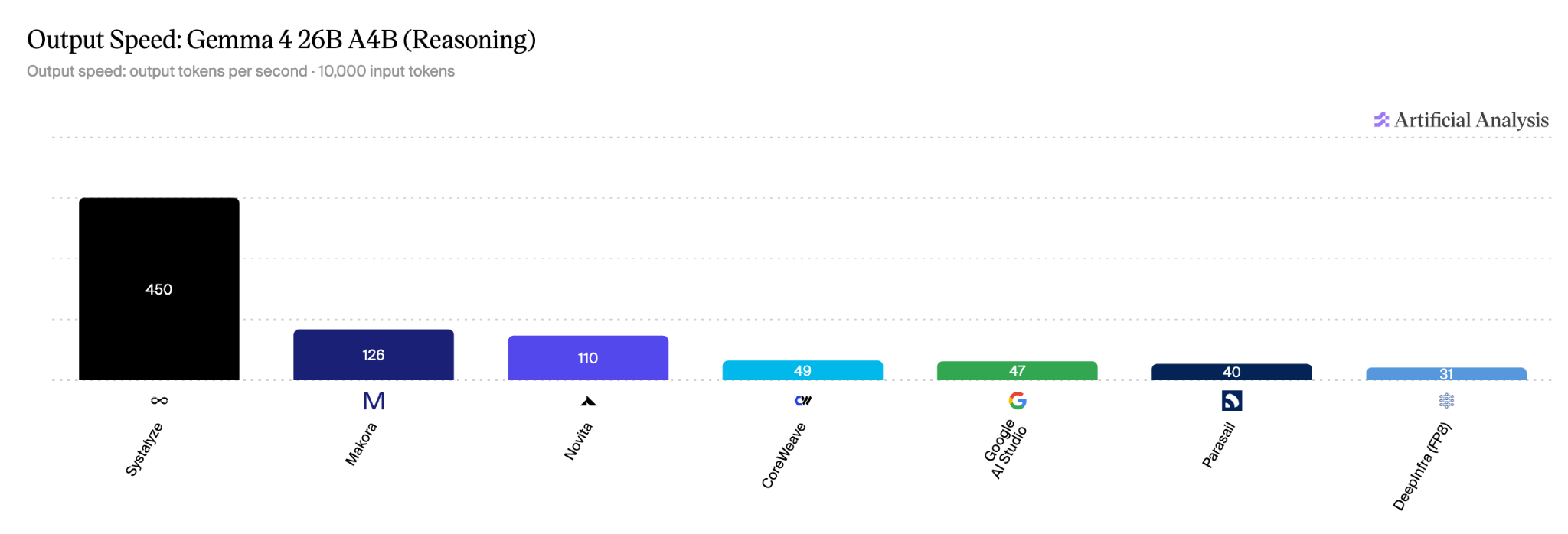
450 tokens per second
#1 of 7 providers on output speed: 3.5× the next fastest provider and 9.6× Google AI Studio.
Output speed. How many tokens per second the model produces once it starts writing, measured with a 10,000-token prompt. This is raw generation speed. Higher is better.
Tokens per second · ↑ higher is betterOur gain
- Systalyze#1 fastest450 t/s
- CoreWeave49 t/s9.1×
- Google AI Studio47 t/s9.5×
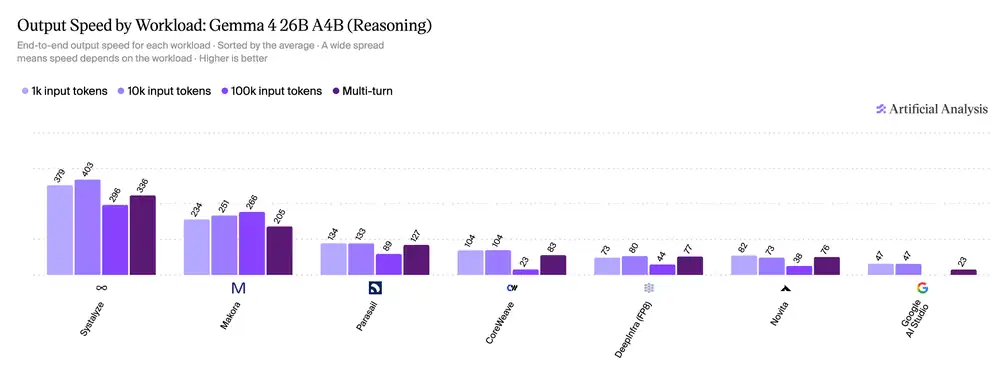
Up to 403 tokens per second, at every prompt length
Fastest on every workload: 379 t/s with 1k-token prompts, 403 with 10k, 296 with 100k and 336 in multi-turn sessions.
Speed by workload. Output speed measured separately with 1k, 10k and 100k-token prompts and in multi-turn agent sessions. It shows whether a provider stays fast as prompts get longer and conversations go on. Higher is better.
Multi-turn output speed, tokens per second · ↑ higher is betterOur gain
- Systalyze#1 fastest336 t/s
- CoreWeave83 t/s4.0×
- Google AI Studio23 t/s14.6×
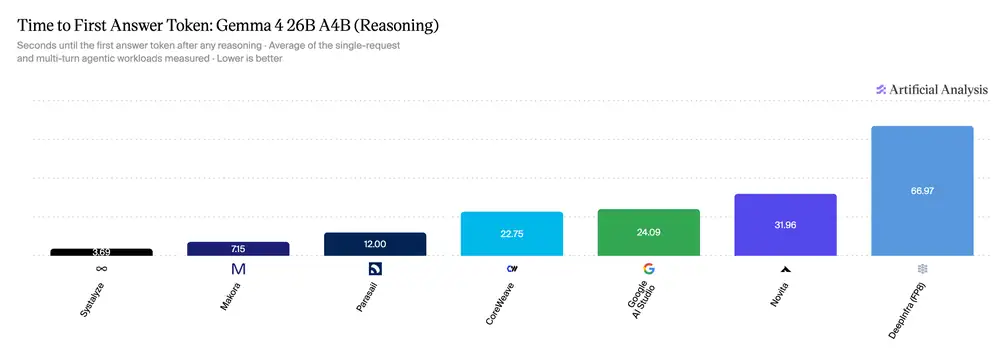
3.69 seconds to first answer token
About half the wait of the next fastest provider, and 6.5× faster than Google AI Studio.
Time to first token. How long a user waits before the answer starts to appear, after any reasoning. This is what makes an app feel responsive. Lower is better.
Seconds to first answer token · ↓ lower is betterOur gain
- Systalyze#1 fastest3.69 s
- CoreWeave22.75 s6.1×
- Google AI Studio24.09 s6.5×
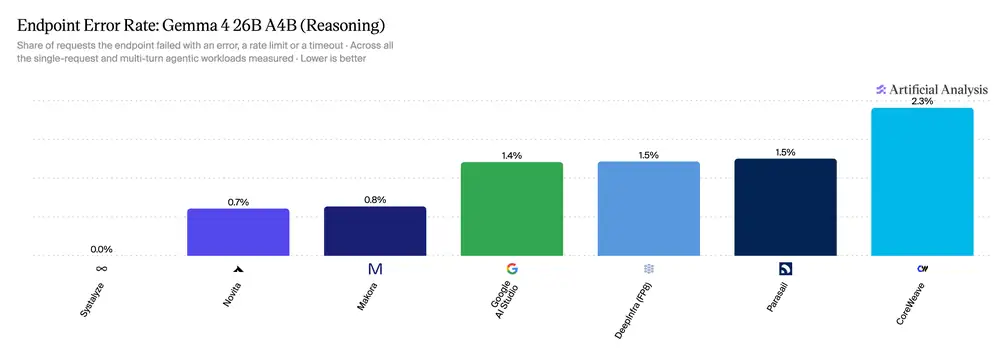
0.0% errors
The only endpoint with zero failed requests, out of 7.
Error rate. The share of requests that failed with an error, a rate limit or a timeout, across every single-request and multi-turn agent workload measured. A fast endpoint is only useful if the answer arrives. Lower is better.
Share of requests that failed · ↓ lower is betterOur gain
- Systalyze#1 lowest0.0%
- Google AI Studio1.4%
- CoreWeave2.3%
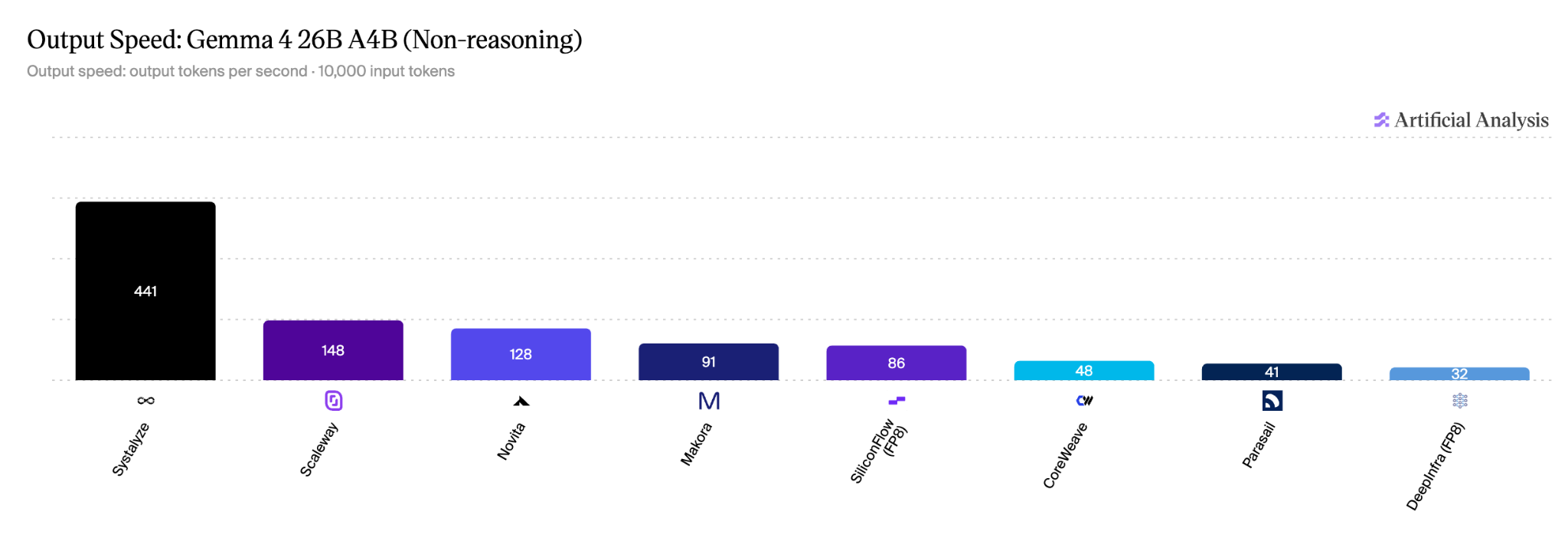
441 tokens per second
3.0× the next fastest provider, and 9.2× CoreWeave.
Output speed, non-reasoning. Tokens per second with the model's reasoning turned off, the mode used for quick chat and simple tool calls. Higher is better.
Tokens per second · ↑ higher is betterOur gain
- Systalyze#1 fastest441 t/s
- CoreWeave48 t/s9.1×
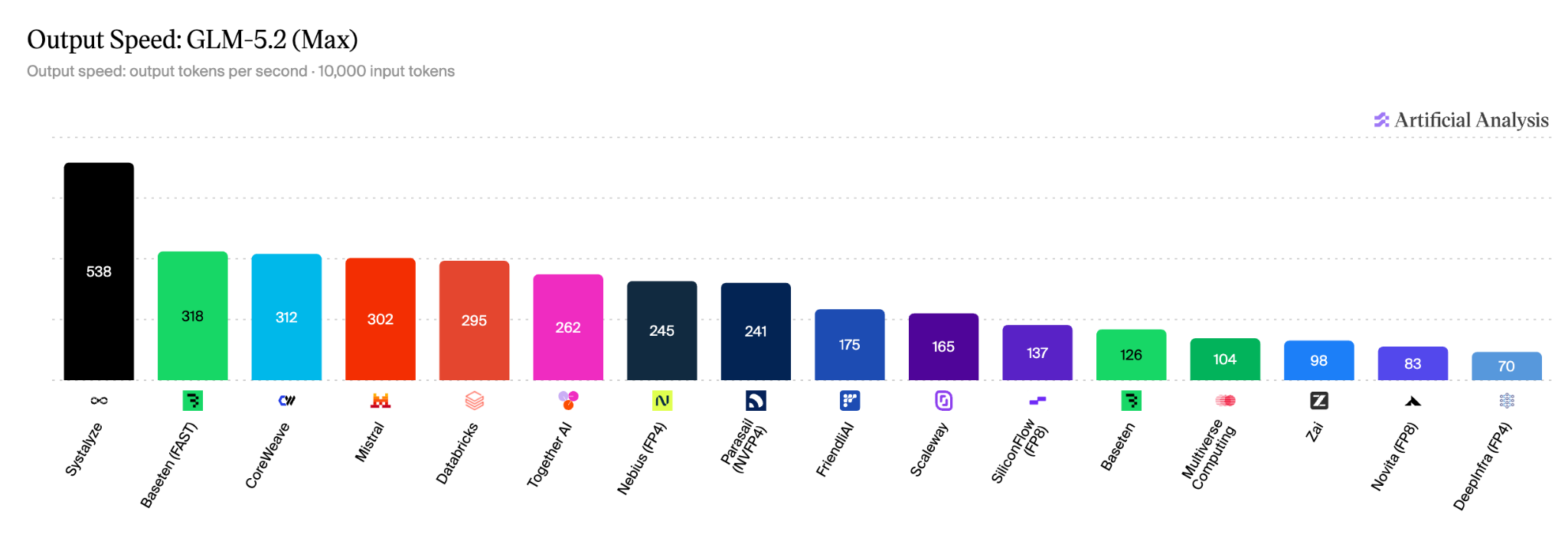
538 tokens per second
#1 of 16 providers: 1.6× Baseten (Fast) and 5.5× Z.ai's own API.
Output speed. How many tokens per second the model produces once it starts writing, measured with a 10,000-token prompt. This is raw generation speed. Higher is better.
Tokens per second · ↑ higher is betterOur gain
- Systalyze#1 fastest538 t/s
- Baseten (Fast)318 t/s1.6×
- Databricks295 t/s1.8×
- Together AI262 t/s2.0×
- Nebius (FP4)245 t/s2.1×
- Baseten126 t/s4.2×
- Z.ai's own API98 t/s5.4×
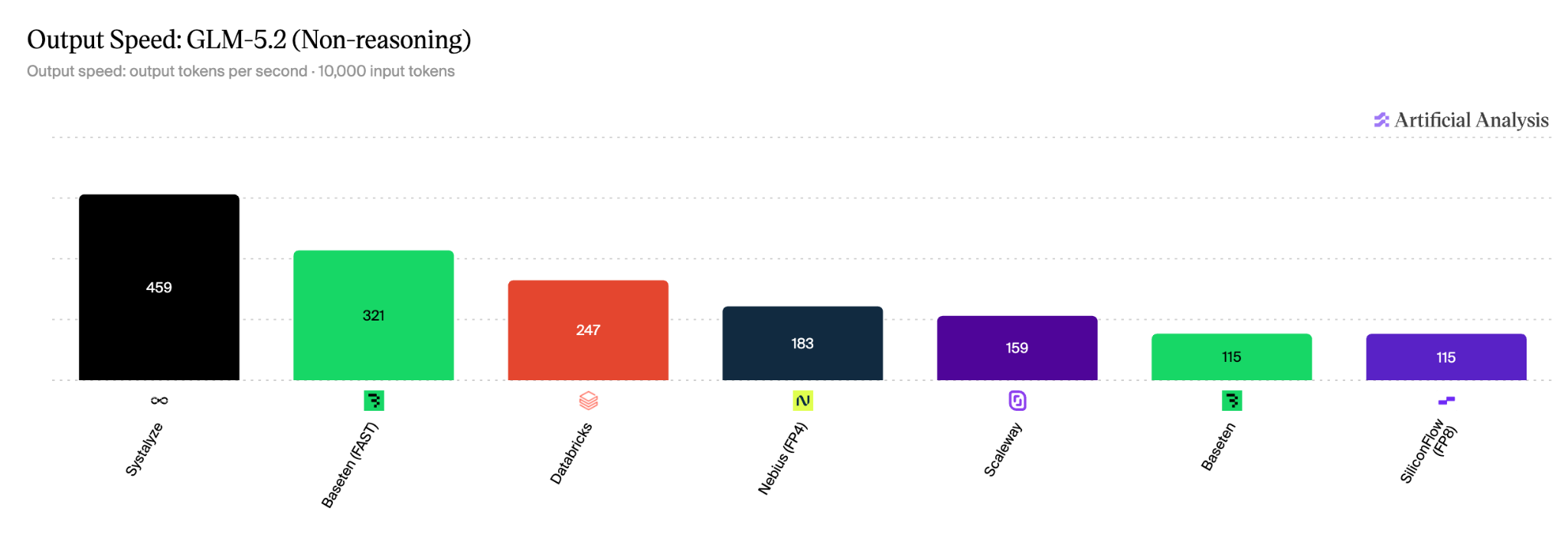
459 tokens per second
1.4× faster than Baseten (Fast).
Output speed, non-reasoning. Tokens per second with the model's reasoning turned off, the mode used for quick chat and simple tool calls. Higher is better.
Tokens per second · ↑ higher is betterOur gain
- Systalyze#1 fastest459 t/s
- Baseten (Fast)321 t/s1.4×
- Nebius (FP4)183 t/s2.5×
- Baseten115 t/s3.9×
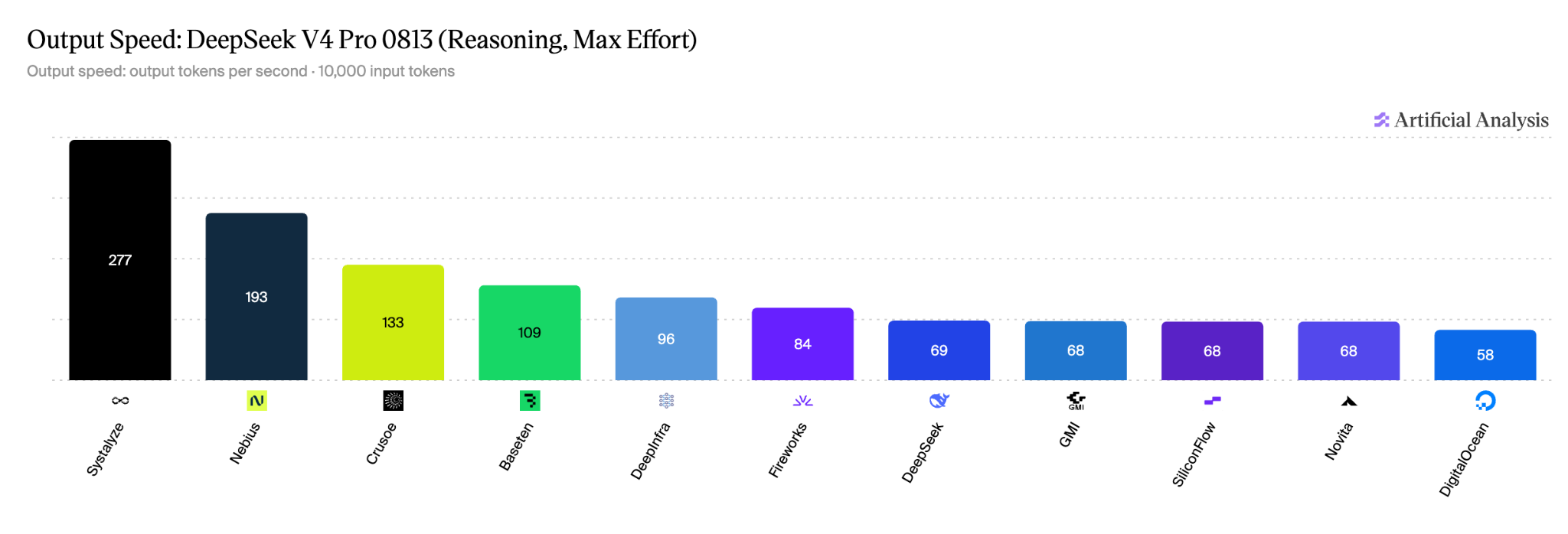
277 tokens per second
#1 of 11 providers on output speed: 1.4× Nebius and 4.0× DeepSeek's own API.
Output speed. How many tokens per second the model produces once it starts writing, measured with a 10,000-token prompt. This is raw generation speed. Higher is better.
Tokens per second · ↑ higher is betterOur gain
- Systalyze#1 fastest277 t/s
- Nebius193 t/s1.4×
- Baseten109 t/s2.5×
- Fireworks84 t/s3.2×
- DeepSeek's own API69 t/s4.0×
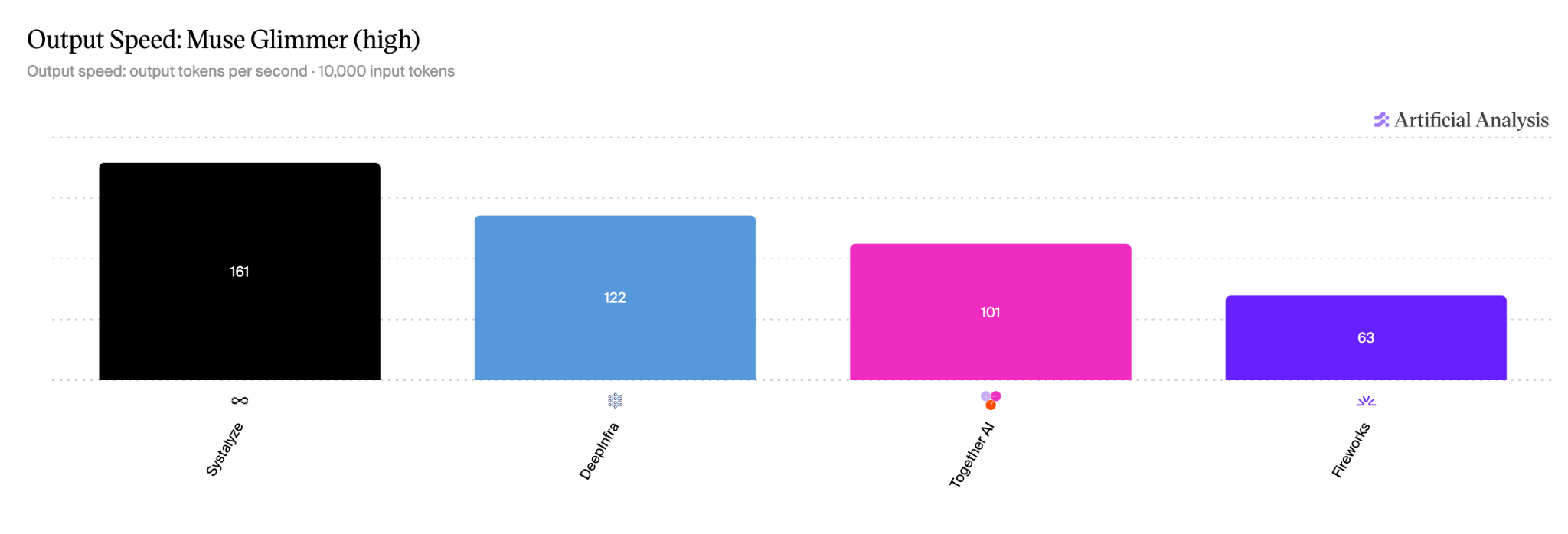
161 tokens per second
#1 of 4 providers on output speed: 1.5× Together AI and 2.5× Fireworks.
Output speed. How many tokens per second the model produces once it starts writing, measured with a 10,000-token prompt. This is raw generation speed. Higher is better.
Tokens per second · ↑ higher is betterOur gain
- Systalyze#1 fastest161 t/s
- Together AI101 t/s1.5×
- Fireworks63 t/s2.5×
Models and pricing.
Pay per token. No minimums.
| Model | Context | Input / 1M | Cached input / 1M | Output / 1M |
|---|---|---|---|---|
| DeepSeek-V4-Flash-0731 | 1M | $0.10 | $0.03 | $0.28 |
| DeepSeek-V4-Pro-0813 | 1M | $0.50 | $0.04 | $2.00 |
| DeepSeek-V4.1-Flash-1017 | 1M | $0.30 | $0.01 | $1.20 |
| Kimi-K3.1-Pro | 1M | $2.00 | $0.20 | $10.00 |
| Qwen3.8-27B | 1M | $0.10 | $0.01 | $1.00 |
| GLM-5.3 | 1M | $0.50 | $0.05 | $1.00 |
| GLM-5.3-Flash | 1M | $0.10 | $0.01 | $0.50 |
Prices are USD per 1M tokens.
Switch in one line.
Keep the code, agents and harnesses you already have. Get your base URL and API key from the console, set these two environment variables, and pick a model.
import os
from openai import OpenAI

client = OpenAI(
    base_url=os.environ["SYSTALYZE_BASE_URL"],
    api_key=os.environ["SYSTALYZE_API_KEY"],
)
Start serverless. Scale to dedicated.
Serverless
Call any model instantly and pay only for the tokens you use. Best for prototypes and variable traffic.
Dedicated
Reserved hardware tuned to your traffic, for predictable latency, higher throughput and isolation. Choose from any open-source models or bring your own fine-tuned model.
How do we get this fast?
Every other inference provider starts from the same open-source models. What sets us apart is the layer between the model and the hardware: Systalyze’s performance intelligence, built from systems research at MIT CSAIL. It continuously monitors each model, hardware and the live traffic, then optimizes the whole stack in real time: kernels, decoding, batching and scheduling, caching and memory, parallelism, networking, routing and scaling.
Your data
Zero data retention. We don’t store your prompts or outputs.
Read our privacy policy.
Make your first call in minutes.
Don’t want a public API? Run our optimized models inside your own environment with Systalyze Sovereign AI: on your own hardware, in your cloud or on-prem, with your data staying with you. Explore Sovereign AI